Photography Tips & Tricks
- Started
- Last post
- 127 Responses
- mg330
Finally... I could see getting addicted to using this method very often. Since I'm only a few weeks into using my D90 I'm certainly aware of trying to develop a consistency with things, but the thing I like about a saturated effect is that the photo just looks more alive. There's more of a story to it in a way. I don't exactly know how to explain why. In the before and after images above, the Afters just look much better, though at the expense of not really capturing the brightness of the fall leaves.
- big-papes0
* If you're unsure how your pictures are coming along, don't be afraid to open the camera and hold the film up to the sun for a sneak peek.
* Some photographers use a tripod for stability, but for maximum steadiness, use a dodecapod.
* Variety is key! For a change of pace, try folding back the labial lips.
* If surrounded by a group of thugs who want to steal your camera, simply fawn over them and insist that you can make them stars.
* Shutter speed is crucial in photography somehow.
* Don't take your film to Walgreens for development. Those guys are, like, Nazis.
* Rather than gawking at attractive women who pass you on the street, take a picture. It will last longer.
* Make sure the subjects of your photos are always smiling. No one likes a frowny-face.
* Amaze your friends with the remarkable Mini Secret Spy Camera! Fits in pocket. Undetectable. Weighs 2 1/2 oz. Precision ground lens. Film included. Super! . . . . . . . . . . . . . $1.25
* Vinnie DiResta of Brooklyn, NY, has got something you can take a picture of right here.
* Dogs wearing funny hats always make for a powerful artistic statement.
* European photo magazines are an excellent way to see naked women without feeling like a dirty lech.
* Kodachrome film will give you the nice bright colors, give you the greens of summer, make you think all the world's a sunny day.
- flashbender0
since someone was talking about ps filters and actions:
http://creativenerds.co.uk/freeb…
There are some shit ones in there, but there are a few nice ones dealing with saturation / vintage / color effects
- OSFA0
Nice thread ;)
- bigtrick0
@Chimp:
that's interesting. I used to make my custom bokeh by sticking a small piece of cut-out cardboard inside the camera, in front of the mirror, right behind the lens. I didn't realize it would work in front of the lens too.
- version30
real vignette read:"dark corners" is also accompanied by a lack of focus. this "depth of field" is evident as the foreground overlaps the background with sharpness over softened blur. ps can do fuck all to chase what a lens captures in a fraction of a second
- OSFA0
more! more!!!
- dibec0
Number one thing ... Shot in *RAW format.
Number two thing ... Get a RAW editor (Lightroom).
Number three thing ... Practice, Practice, Practice.
- inv0

Nice page to explain Aperture, shutter and ISO value and the relations between them. There is also a simulator there that lets you se the result of varying them
- dibec0
I highly recommended this site. It's a total photog nerd site. have fun noobs ... http://www.cambridgeincolour.com…
- dibec0
and the tuts section is really cool as well. http://www.cambridgeincolour.com…
- OSFA0
Thanks dibec!
- OSFA0
this is pretty...
- lumedia0
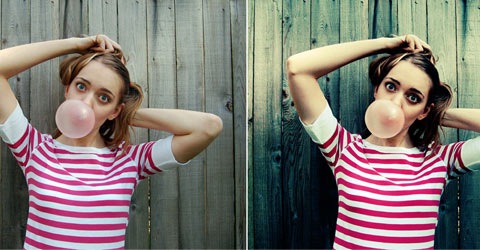
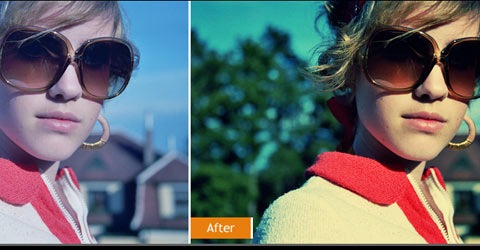
Here is a method i came up with to get a good vintage look:
1. Duplicate your image.
2. invert the copy and set the blending mode to color and the opacity to 45%
3. add a Vibrance adjustment layer and pump it almost all the way up.
4. add a curves adjustment layer and pull the highlights down and the shadows up on the blue channel.
5. add a vignette if you want. Done.Here are some before afters using this method:


and here is a link to one of the PSD files:
http://dl.getdropbox.com/u/39748…
I hope some of you can make use of this.
- OSFA0
So, how bout them pictures ^ there.... Any tips? tutorials? Thanks!
- OSFA0
Bump!
- lumedia0
no, just a visual reference so you can make a more informed decision when choosing your aperture.


