wireless external HD
- Started
- Last post
- 22 Responses
- Atkinson
are there any? Any good?
- brains0
I just have my airport connected via usb to an external HD. Works just fine.
- jfletcher0
oh that's cool. I need to do that.
- Meeklo0
probably really slow to work w/ audio/ video?
- AC020
- Llyod0
300 bucks?
- Meeklo0
- not really wireless? is that like not really alive or not really a horse?cosmicEntity
- hahahaMeeklo
- Atkinson0
airport extreme? so is this thing good, just reading, sounds nice
- mattiaBK0
I do it, but it's slow if you work with big heavy documents.
- brains0
Yep, this:

and I also have this to wirelessly stream my music to my stereo system:
- madirish0
why? why not have a direct connection? unless the data amount is super-small. so nice to have FW800 or USB2 for this sort of thing. that, or 10/100 LAN..... which i am guessing your wireless connection is not optimized for?
- Atkinson0
yeah, the studio is in the garden, my widfe works in the house. It'd be good to share a printer and HD and not have to take the HD in and out of the studio each day - safer in the house. I believe you have to use these with the wireless moden supplied by broaband provider?
If that's so, we already have a wireless modem / router, how will the two wirelesses work?- studio in the garden .........23kon
- .......23kon
- ..... showoff!!!23kon
- Wife...cosmicEntity
- .......................cosmicEntity
- ..dangcosmicEntity
- hahaAtkinson
- pics or...cashface
- brains0
Hmm, if you have a usb input on your wireless router you can just hook the HD up to that, otherwise, you'll have to hardwire the Airport ( which is just a router) to the modem, as it has a USB input. Only one though, so you can either share a printer, or the HD. Up to you.
- Atkinson0
so if my existing modem /router has usb i don't need airport?
- rafalski0
Airport Express - Ethernet + WiFi router + Airtunes speakers out jack + USB for printer only
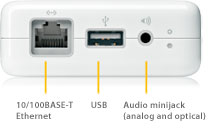
http://www.apple.com/airportexpr…Airport Extreme - 4xEthernet + WiFi router + USB for hard drive

http://www.apple.com/airportextr…Time Capsule - 4xEthernet + WiFi router + USB for hard drive + a 500GB/1TB hard drive inside, basically Airport Extreme with a hard drive in it.

http://www.apple.com/timecapsule…Unless Airport Extreme has external USB drive power management, I'd choose Time Capsule with its internal (upgradeadable) drive. The Airport, without PM it might keep the external drive spinning at all times, which isn't the healthiest option out there..
- Atkinson0
thanks for that. if my modem is already a wireless router as well will this not interfere with the airport wireless signal?
- rafalski0
Is it a wifi-n or only wifi-g router?
- Atkinson0
g
- rafalski0
Just like mine, the provider gave me a cheap g - they always do.
I plugged my Airport Express to the g modem/router via Ethernet to pick up the internet connection from it and broadcast my own n network with it. Quite easy to set up.
You want to upgrade your computers to n, the difference is noticeable - actually it's annoying to use a network drive through g.If your budget allows, I'd take the Time Capsule (I'm planning to get one soon). You can always plug in an extra USB drive to it or upgrade the drive inside.
Just as a side note - neither Lightroom nor Aperture support shared network drives! There are workarounds, but a tad risky.

