QBN'r AI Slop of the day
QBN'r AI Slop of the day
Out of context: Reply #63
- Started
- Last post
- 123 Responses
- hans_glib0
ok forgive the n00biness of this diversion (it should probably be in the 3d/blender thread) but i ran my slop thru hitem and it made a decent stab at isolating the main hanging heads. (i was hoping it might make the whole horror cell but wth.) - left hand image
successfully exported an obj and glb file.
opened the glb in blender, imported the .png mesh that i found in the in the obj folder and bingo it was appiled outomatically by blender! - middle image
but that png file - right hand image. i've no expertise with blender at all, but how the fuck does one learn how to create a thing like that? how is it even mapped onto the mesh? - i would expect those hard lines to show on the render (spot the old infini-d user).
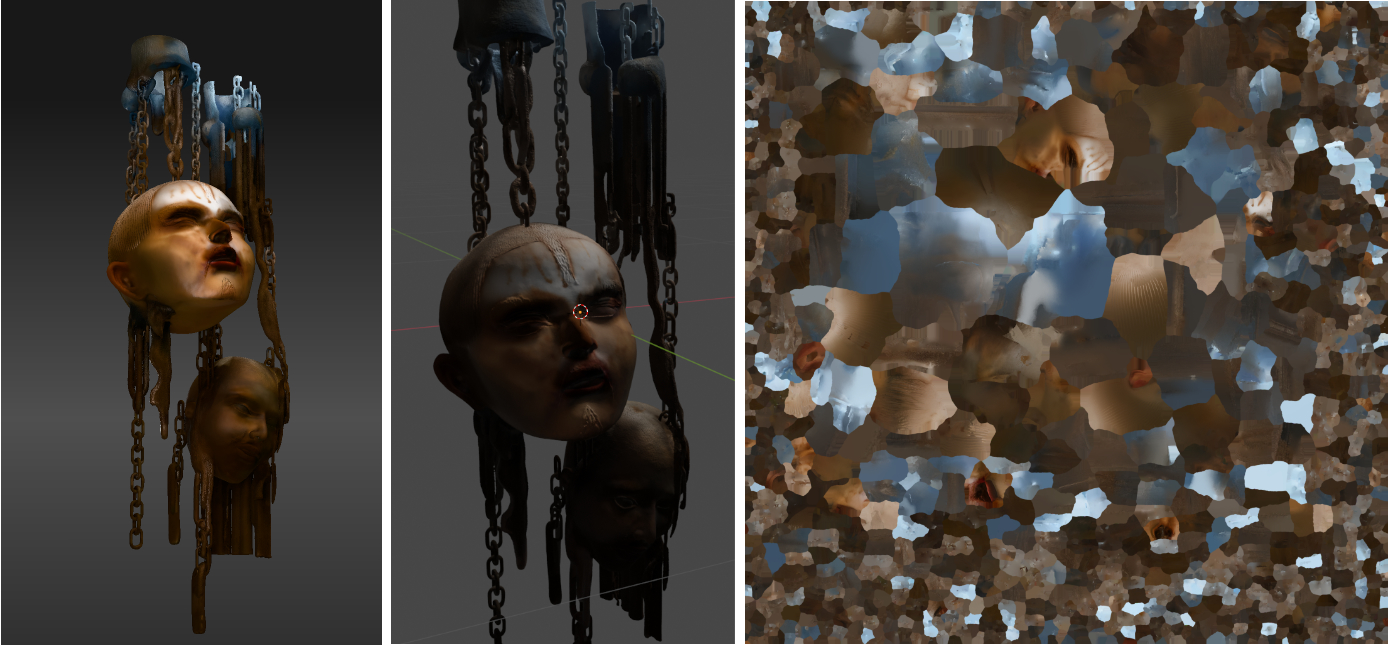
- oh yeah, no lighting added in blender, obvshans_glib
- if you created it it would be as several distinct objects each with their own texture so those images would make more sense and have less hard lineskingsteven
- you can separate meshes, unwrap and rebuild new textures for each new object within blender but this is maybe a bit to mangled for thatkingsteven
- yeah i was fascinated that hitem created it all as one blob. if i was going to do it it would be a series of individual elements. so time consuming tho!hans_glib
- and head meshes - waaay beyond me. how to do the hair? individual strands? no thanks...hans_glib
- but the maths involved in stitching that mosaic together and then applying it... does my head in.hans_glib
- haha totally, this looks like it's trying to fit as much in a fixed texture size as possible larger UV projections in the center. I've seen similar importingkingsteven
- models before (pre-generative-AI-3... so it must be some sort of compression or optimisation packing algorithmkingsteven
- tbh you may try unpacking and repacking in blender and see what happens, it could pop out something more legible if working with larger texture dimensionskingsteven
- I'm not a blender user, but many other 3d apps have an UV unwrap feature where you can select the type of unwrapping of the texture. Look for that.ShenanigansTV
- < yep. Mark some of the edges as "seams" where cuts in the texture can be (where they aren't too visible in your scene)...sausages
- Then, in edit mode select your object and then UV Project (In the UV tab). The mapping should make more sense.sausages