Canon 7D to Vimeo
- Started
- Last post
- 6 Responses
- Guss
Does anyone know of any step by step online tutorials for a best way to export your Canon 7D video footage to Vimeo? I've tried using various programs like After Effects, Premiere, etc, but they all end up looking like shit when uploaded to Vimeo. Thanks.
- DoTheMacarena0
Look like shit how? Do you have a pro account with HD enabled? You can just upload the file directly, or if it's edited, follow this:
- Chief0
any insight into what you're doing now would help... aside from just using after effects.
i start by transcoding everything to prores before editing. then, after editing/cc i export a lossless quicktime, a master. compress that according to the vimeo guidelines... using h264, etc.
- Miguex0
All you need is quicktime.
use this settings and you are good to go
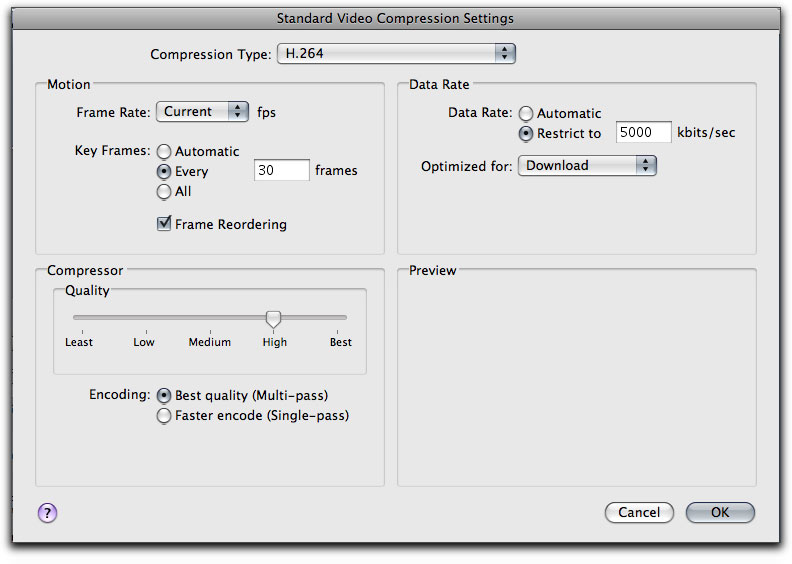
- just make sure your key frames match your frame rate.Chief
- The keyframes don't have to match the frame rate. Less keyframes (i.e. a higher value) generally results in smaller filesizes.Ctrlx
- yeah key frames and frame rate are different thingsMiguex
- they are different things, but you want them to either match or a multiple.Chief
- keyframes are when you tell the codec to stop basing its compression on the previous frame and go back to the orig. source frames.Chief
- original source frames.Chief
- lambsy0
can you post screenshot of original video, and the uploaded video next to it?
- autoflavour0
are you talking about color shift/loss? if so.. yep, i know your pain.
the h264 codec in compressor is shite.you need to download the x264 opensource one.. have a read up online about the color issue..
that is of course if that is what you are talking about..
- autoflavour0
eitherway, getting a good version on vimeo requires a lot of patience and a liberal dose of experimentation.. i ended up uploading about 6 different versions to vimeo before picking one to go public with..
my advice also.. pay for vimeo.. its cheap and makes this process much less painless..