
color profiles 4 web 1010 Responses

Last post: 2 years, 2 months ago | Thread started: Mar 24, 11, 2:42 p.m.

RespondNew TopicDisable Images

  • lumedia

    a question for web developers out there.

    How do you handle color profiles in JPGs that are displayed online?

    I was converting to sRGB and uploading but the colors displayed really saturated in Chrome but fine in FF.

    I then converted to sRGB, stripped out the profile, and uploaded. Colors are still too saturated in Chrome but fine in FF.

    Mar 24, 11, 2:42 p.m. – Permalink
  • Christian

    http://www.viget.com/inspire/the…

    next note >add note

    You must be logged in to add a note. Login now or register for an account.

    Cancel
    Dog-earMar 24, 11, 2:42 p.m. – Permalink
  • aldebaran

    an example would help

    next note >add note

    You must be logged in to add a note. Login now or register for an account.

    Cancel
    Dog-earMar 24, 11, 2:50 p.m. – Permalink
  • lumedia

    ^ this guy is saying not to convert to sRGB. that doesnt make any sense. if you have all different kinds of profiles on your images they will all display improperly on a browser that doesnt read profiles.

    next note >add note

    You must be logged in to add a note. Login now or register for an account.

    Cancel
    Dog-earMar 24, 11, 2:54 p.m. – Permalink
  • aldebaran

    ^you're correct and it sounds like you're doing everything right....

    examples....

    next note >add note

    You must be logged in to add a note. Login now or register for an account.

    Cancel
    Dog-earMar 24, 11, 2:55 p.m. – Permalink
  • aldebaran

    are you using a custom monitor profile? maybe one of the browsers isn't respecting/using your monitor profile

    • yes, its calibrated to a custom profilelumedia
    + add note

    You must be logged in to add a note. Login now or register for an account.

    Cancel
    Dog-earMar 24, 11, 2:56 p.m. – Permalink
  • aldebaran

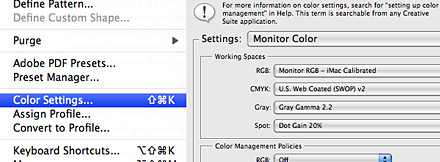
    http://www.viget.com/uploads/image/color_3_settings.jpg

    his rgb space is set-up to his monitor profile... probably the beginning of his problems...

    • thats not good.
      i am getting an example together now. hold tight.
      lumedia
    + add note

    You must be logged in to add a note. Login now or register for an account.

    Cancel
    Dog-earMar 24, 11, 3 p.m. – Permalink
  • lumedia

    http://kylepero.com/commercial/

    all these images are tagged with sRGB.

    looks good in FF and Safari, chrome is displaying them neon style!
    next note >add note

    You must be logged in to add a note. Login now or register for an account.

    Cancel
    Dog-earMar 24, 11, 3:11 p.m. – Permalink
  • aldebaran

    the images look the same in chrome and ff on my end

    what are your color management settings in photoshop?

    what is your working space set to?

    under "color management policies" do you have all the check boxes checked?

    • set to preserve all profiles. i dont think PS is the culprit.lumedia
    + add note

    You must be logged in to add a note. Login now or register for an account.

    Cancel
    Dog-earMar 24, 11, 3:17 p.m. – Permalink
  • aldebaran

    "yes, its calibrated to a custom profile"

    get rid of your profile and see if it makes a difference

    • nope, that doesnt work.
      it has to be something that chrome is doing
      lumedia
    + add note

    You must be logged in to add a note. Login now or register for an account.

    Cancel
    Dog-earMar 24, 11, 3:18 p.m. – Permalink
  • lumedia

    http://dl.dropbox.com/u/397485/QBN/Screen%20shot%202011-03-24%20at%203.50.59%20PM.png

    chrome on left, safari on right

    • how about on other computers?aldebaran1/2
      both my home and work computers do it.lumedia2/2
    next note >+ add note

    You must be logged in to add a note. Login now or register for an account.

    Cancel
    Dog-earMar 24, 11, 3:52 p.m. – Permalink

Login or Register to respond to this

Skip to main content