Actionscript Classpath Problem
- Started
- Last post
- 29 Responses
- CyBrain
I have never been successful setting Classpaths.
Here is my situation.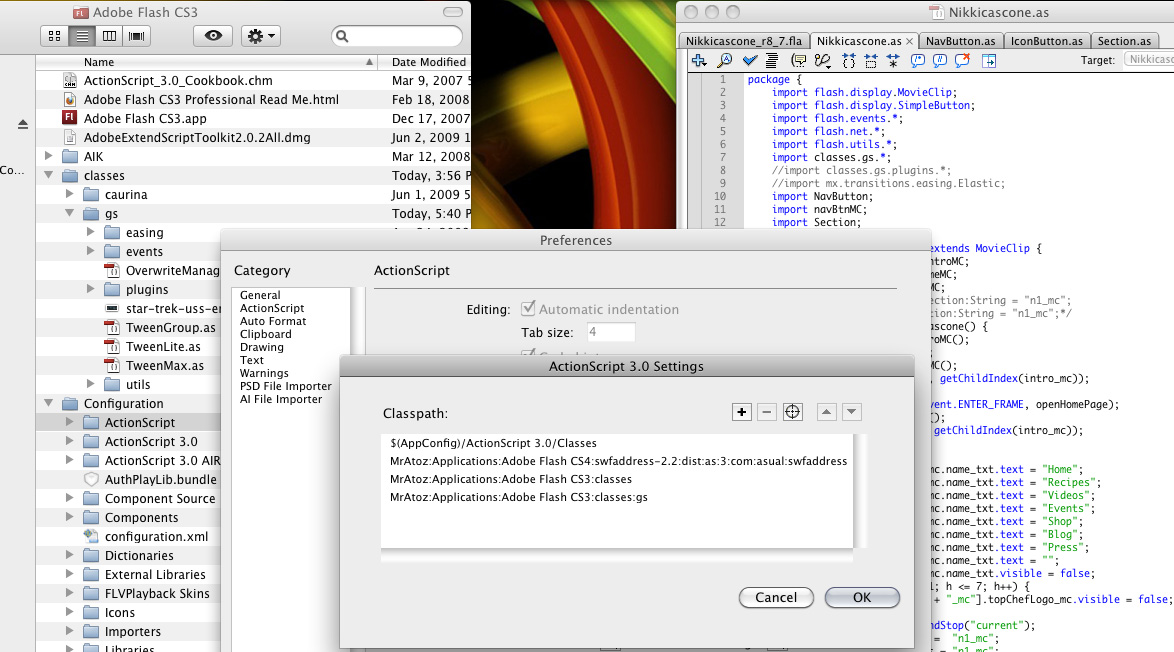
On the left is my Flash application window which shows where my Tweenlite classes are.
In the middle is my application level classpath Actionscript 3 settings.
On the right is my document class where I tried to import Tweenlite on line 7.I'm not sure if it was necessary, but I put the same line at the top of NavButton.as since the buttons will trigger a tween.
My errors are
1172: Definition classes.gs could not be found. for line 7 in my document class
and
5001: The name of package 'gs' does not reflect the location of this file. Please change the package definition's name inside this file, or move the file. /Applications/Adobe Flash CS3/classes/gs/TweenLite.as for the Tweenlite.as code line where it says package...That second error is in Tweenlite.as. I didn't alter any of the Tweenlite classes.
I've looked up a bunch of tutorials and forums that seem to contradict each other or are very vague about how to set the classpath in the preferences.
Any help would be greatly appreciated.
- juskin0
well here is the thing, your importing all the classes in the gs directory via your classpath, however on line 7 your importing it in a path, something.otherSomething.*; I think you need to get rid of your last classpath, or just import gs.*;
personally I have created a folder in my home folder called class, inside that folder, I have two folders AS2 and AS3 and I put all of my classes in there, then all you have to do is set the classpath once, and home/class/AS3 then becomes the root for importing classes, with it set up like this, I would import like such:
import gs.*;
hope this makes sense...
- CyBrain0
I think that got me closer, but I'm still getting two errors.
1120: Access of undefined property Quad.
- juskin0
also, your using packages, since you have no package name, everything is at that root level, so I dont think the classes prefix is necessary, especially since your explicitly importing everthing in the classes folder. your classpaths are importing everything for you automatically, and since your last classpath is already importing gs, either get rid of that, or you should import each class individually. I would get rid of the last classpath and also get rid of classes.gs.*; and just use :
import gs.*;
here is a the explanation which is more important than just fixing the problem.....
with classpaths when you navigate to a directory on your drive, that is your root level of where you begin your import statements.
so, your classes directory, if you had a single class called greenButton IN your classes directory, the way you would import that would simply be:
import greenButton;if you had the gs folder IN your classes directory the way you import that would be:
import gs.nameOfClass;
and of course to import ALL of the classes you would use:
import gs.*;now lets say there is a folder INSIDE of your gs folder, the way to import that would be:
import gs.nameOfFolder.nameOfClass;
or to import all of the classes in the subfolder:
import gs.nameOfFolder.*;hope this helps...
- That completely helps. I never found this explanation elsewhere. Still getting errors though.CyBrain
- akoni0
does your gs classes have the right package classes.gs { etc?
- juskin0
well quad sounds like an easing class
which has to be imported separately, I cant
see all of your code so im not sure if your
using a easing function...
- CyBrain0
I got that error on line 36 of this code.
http://pastebin.com/f3f871276and I'm still getting 5001: The name of package 'gs' does not reflect the location of this file. Please change the package definition's name inside this file, or move the file. /Applications/Adobe Flash CS3/classes/gs/TweenLite.as for the Tweenlite.as code line where it says package...
- juskin0
ok first off you are calling an easing function used within tweenlite so inside the gs directory there should be a folder called easing which you have to import as well
- CyBrain0
Here's my document class:
http://pastebin.com/f3a0480a7
and here's that NavButton class:
http://pastebin.com/f3a0480a7
- juskin0
next thing check to make sure you have the newest version of the class, as they update frequently
- noiseisthis0
import gs.*;
import gs.easing.*
- juskin0
im trying to figure out this package thing I would recommend downloading the newest class, and you removed the classpath to the gs folder correct?
- CyBrain0
Yes:
import gs.*;
import gs.easing.*;
import fl.motion.easing.*;Full code here...
Document class:
http://pastebin.com/d2ae29891
NavButton class:
http://pastebin.com/d1ec38a97
- noiseisthis0
publish setting > flash > settings > souce path > click folder and add the classes folder
- Did that already. See the screen shot in my original post. http://talesfromtheh…CyBrain
- juskin0
I also need the navBtnMC, and Section classes, the only erros Im getting are related to those classes...
- juskin0
and with this are you creating instances of your three imported classes?
private var intro_mc:introMC;
private var home_mc:homeMC;
private var nav_mc:navMC;if so I think they should be a new instance of the imported class... like :
private var nav_mc:NavButton;
- juskin0
or are those clips in your fla?
- CyBrain0
That's the nav button class
http://pastebin.com/d1ec38a97
and here's the section class
http://pastebin.com/f405190ab
- CyBrain0
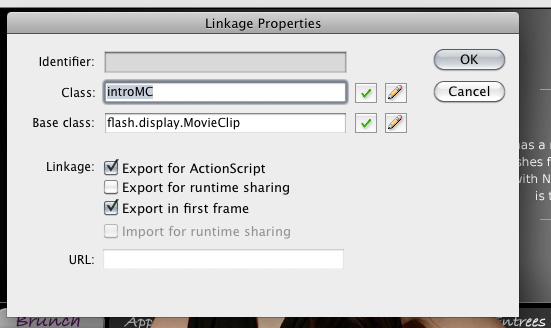
Class name:
- cuke4260
cybrain ping me if you want me to send a basic set of files to break down the structure of how to set it up. probably easier to begin that way.