canon 40d / red spot 1616 Responses

Last post: 3 months, 3 weeks ago | Thread started: Aug 12, 08, 5:45 a.m.

RespondNew TopicDisable Images

  • stewart

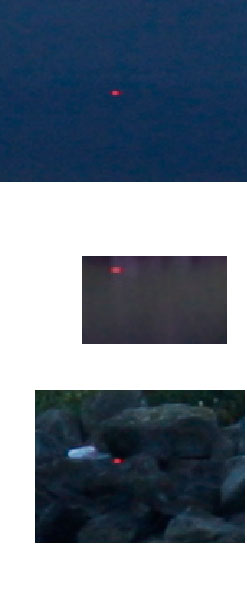
    when i zoom in on the pictures i can see there's a 8px wide red spot on every picture i take with my new 40d.
    with different lenses it stays on the same place every picture. it looks like it's getting worse when using longer exposure times (>30 seconds).

    what's wrong here?

    http://www.kulsdom.com/qbn/40dspot.jpg

    Aug 12, 08, 5:45 a.m. – Permalink
  • nicnichols

    dead spot or dirt on the chip...
    did you try cleaning the chip?
    ...do so carefully.. read what cannon says in the manual about chip cleaning-

    + add note

    You must be logged in to add a note. Login now or register for an account.

    Cancel
    Dog-earAug 12, 08, 5:46 a.m. – Permalink
  • zaq

    http://www.iaogallery.org/gallery/events/red%20dot/web%20red-dot.jpg

    next note >add note

    You must be logged in to add a note. Login now or register for an account.

    Cancel
    Dog-earAug 12, 08, 5:52 a.m. – Permalink
  • epigraph

    send it in if it's new

    next note >add note

    You must be logged in to add a note. Login now or register for an account.

    Cancel
    Dog-earAug 12, 08, 5:55 a.m. – Permalink
  • zaq

    http://www.flickr.com/groups/40d…

    next note >add note

    You must be logged in to add a note. Login now or register for an account.

    Cancel
    Dog-earAug 12, 08, 5:55 a.m. – Permalink
  • ok_not_ok

    dead pixel. return it and ask for a new one.

    next note >add note

    You must be logged in to add a note. Login now or register for an account.

    Cancel
    Dog-earAug 12, 08, 6:07 a.m. – Permalink
  • stewart

    it cleans the sensor every time i switch it on or off.
    i can't believe it's dust because it's a red bright spot, and not a dark one...

    next note >add note

    You must be logged in to add a note. Login now or register for an account.

    Cancel
    Dog-earAug 12, 08, 6:09 a.m. – Permalink
  • nikdaum

    Must be the camera's time of the month. Just flatter it and tread lightly and it will go away in a few days.

    next note >add note

    You must be logged in to add a note. Login now or register for an account.

    Cancel
    Dog-earAug 12, 08, 6:11 a.m. – Permalink
  • slappy

    Most cameras have the odd dead pixel, I think there is a procedure for mapping it out.

    Try putting the camera into cleaning mode for 30 seconds while leaving a lens with lens cap on. Supposed to auto fix the stuck/dead pixels. Worth a shot eh?

    My old 300D has like 20 of them. They will look worse on long exposures. If you send your camera in they will just map out the pixel and send it back.

    • 20 of them... that would make me clone-stamping all day long!stewart1/2
      they only show on exposures longer than 10 secs. Plus thats my danger cam, only gets the shit jobs.slappy2/2
    next note >+ add note

    You must be logged in to add a note. Login now or register for an account.

    Cancel
    Dog-earAug 12, 08, 6:12 a.m. – Permalink
  • ninjasavant

    maybe a sniper is trying to kill something in all of your shots

    next note >add note

    You must be logged in to add a note. Login now or register for an account.

    Cancel
    Dog-earAug 12, 08, 6:31 a.m. – Permalink
  • rafalski

    It's not a dead pixel, that would be black (or white depending on technology I think). It's a row of stuck pixels. 8 in a row might be enough for a warranty call.
    Insist on a replacement, rather than fixing it. Fixing means mapping pixels out to show what neighbouring ones are showing.

    next note >add note

    You must be logged in to add a note. Login now or register for an account.

    Cancel
    Dog-earAug 12, 08, 7:13 a.m. – Permalink
  • albertOCAMPO

    yeah, get it replaced if its new. if it's 40d, it should be new enough

    next note >add note

    You must be logged in to add a note. Login now or register for an account.

    Cancel
    Dog-earAug 12, 08, 7:29 a.m. – Permalink
  • Doorman

    yep....technology sometimes has issues.....rtn it for a swap > ask for a new one...not a repair or anything else. Canon got the cash to do it....its not the retailers fault. Manufacturers defect. Dont wait longer ask for a swap!....

    next note >add note

    You must be logged in to add a note. Login now or register for an account.

    Cancel
    Dog-earAug 12, 08, 11:04 a.m. – Permalink
  • omgitsacamera

    Dead Pixel?

    One way of clearing them is leave the camera on bulb or 30 second exposure without a lens. (or probably with a body camp.)

    next note >add note

    You must be logged in to add a note. Login now or register for an account.

    Cancel
    Dog-earAug 12, 08, 11:05 a.m. – Permalink
  • Doorman

    not sure that 40d has that B option...has it?

    • I think you just put it on either S or M and turn the dial all the way back to bulb.omgitsacamera
    + add note

    You must be logged in to add a note. Login now or register for an account.

    Cancel
    Dog-earAug 12, 08, 11:07 a.m. – Permalink
  • jaylarson

    hot pixel.

    next note >add note

    You must be logged in to add a note. Login now or register for an account.

    Cancel
    Dog-earAug 12, 08, 11:40 a.m. – Permalink
  • dibec

    Nope. That is way a stuck pixel. Hot pixels are usally white.

    Can you do a test for me? Take 4 shots. two on a white background - 30 secs (high fstop, and low fstop). Another on black background - 30 seconds (high fstop, and low fstop).

    next note >add note

    You must be logged in to add a note. Login now or register for an account.

    Cancel
    Dog-earAug 12, 08, 11:55 a.m. – Permalink

Login or Register to respond to this

Skip to main content