
InDesign typo wankery 99 Responses

Last post: 5 months, 1 week ago | Thread started: Jun 26, 08, 8:51 a.m.

RespondNew TopicDisable Images

  • lajj

    ok.
    i got this unsolved mystery in IDCS3.

    When I choose Corpid CAPS it is showing me a weird glyph instead of the single quotation mark.

    If I change for the REGULAR one, the "À" is going crazy.

    I cant find/change the weird "D" glyph because ID dont "find" any, although there are like hundreds of them. Its a 100+ pages document. The good glyph exists, but wont show right if I get text from Word.

    This is happening only in ID, CS1 and 3 and all is good in Quark. But I refuse to work in Quark. Its a PS font.
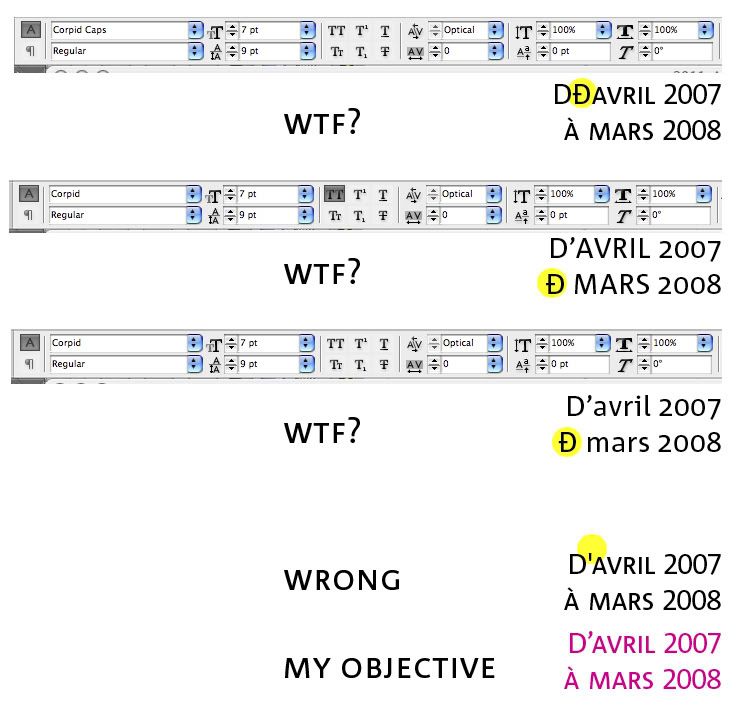
    http://i133.photobucket.com/albums/q70/laslaj/whathtehell.jpg

    This is as far as my english brings me
    thanks

    Jun 26, 08, 8:51 a.m. – Permalink
  • drgs

    glyphs in the font could be mixed up
    try the same in word, or other app

    • so its ok everywhere exept in Illustrator, the glyph simply does not show...lajj
    + add note

    You must be logged in to add a note. Login now or register for an account.

    Cancel
    Dog-earJun 26, 08, 8:59 a.m. – Permalink
  • lele

    Does Corpid CAPS include any "Phonetic" style in the font package?

    • nope. only from light-light italic to heavy-heavy italiclajj
    + add note

    You must be logged in to add a note. Login now or register for an account.

    Cancel
    Dog-earJun 26, 08, 9:11 a.m. – Permalink
  • jaylarson

    Have you looked in the Glyphs pallet in InDesign?

    • yep, but it wont solve my problem. I have a ton of them and the find/change wont worklajj1/3
      with this symbollajj2/3
      the weird D, I meanlajj3/3
    next note >+ add note

    You must be logged in to add a note. Login now or register for an account.

    Cancel
    Dog-earJun 26, 08, 9:19 a.m. – Permalink
  • lumedia

    Dont copy from Word. Just type it manually. I am always inclined to blame microsoft.

    • Even when I type, it wont show right. Exept if I manually insert the good glyph from the palettelajj1/2
      but I cant do that on 100 pages.
      Or maybe I can hire a couple of monkeys
      lajj2/2
    next note >+ add note

    You must be logged in to add a note. Login now or register for an account.

    Cancel
    Dog-earJun 26, 08, 9:30 a.m. – Permalink
  • jaylarson

    It sounds like you may have a corrupt font. I am unsure. But if it is the case, talk with the font foundry (or where the font was purchased from) and they should compensate you with a correct font.

    • yeah I'm affraid I'll have to do this.
      this sucks.
      thanks though
      lajj
    + add note

    You must be logged in to add a note. Login now or register for an account.

    Cancel
    Dog-earJun 26, 08, 9:44 a.m. – Permalink
  • Gucci

    First: Copy and paste the recurring element into your find/replace window.I think the issue here can be resolved with a find/replace of your problem glyph – ID allows for you to replace something with "typographer's quotes" which is what it looks like you want. You can replace with "typographers quotations" from one of the small flyout menus from the find/replace pallette.

    Let me know if this helps.

    Second: take a screenshot of your find/replace window and post it here because you might have a checkbox or something else strange marked off that shouldn't be.

    next note >+ add note

    You must be logged in to add a note. Login now or register for an account.

    Cancel
    Dog-earJun 26, 08, 11:05 a.m. – Permalink
  • lajj

    the problem is, when I copy and paste the bastard in the find/change, it looks fine as you can see
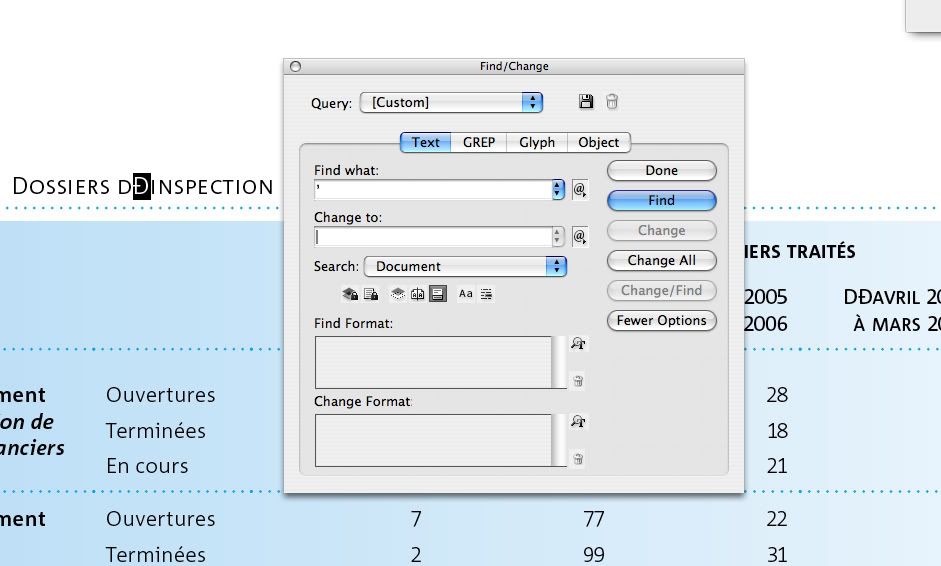
    http://i133.photobucket.com/albums/q70/laslaj/find_change01.jpg

    and if I get it from the Glyph palette and choose "load Glyph in find", ID cant find a match
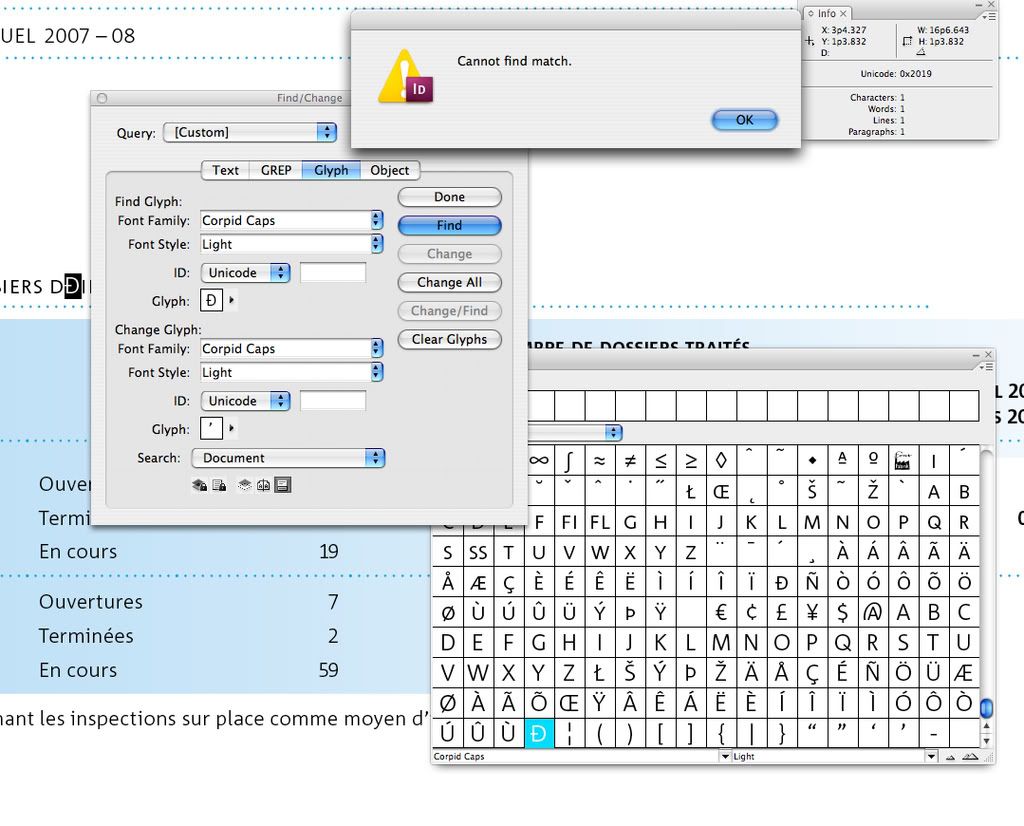
    http://i133.photobucket.com/albums/q70/laslaj/find_change02.jpg

    • everything in the "Quotation Marks" change submenu give me crap. exept the straight QMlajj1/2
      but I want the apostrophe, and it return me a weird glyph againlajj2/2
    next note >+ add note

    You must be logged in to add a note. Login now or register for an account.

    Cancel
    Dog-earJun 26, 08, 11:28 a.m. – Permalink
  • Gucci

    Hm, that IS odd.

    If it's trying to tell you that the weird "D" is actually an apostrophe, then what I would do is change all of the apostrophe D's to another typeface in the family and then change it back to see if it's just some weird thing that will be quickly corrected by a switcheroo.

    Here's the flyout menu I was talking about earlier.

    http://www.5thdesign.com/shared/Picture%202.png

    Use ID's flyout menu in the find/change window to insert your apostrophe's.

    Let me know if that does anything for you.

    (I'd try it with the typeface you're using to see if it's an issue with that face in particular, but I don't have it. I used whitney instead)

    • yeah I tried that menu to get to the apostrophe but no good result. It chaged the weird Dlajj1/2
      for the same thinglajj2/2
    next note >+ add note

    You must be logged in to add a note. Login now or register for an account.

    Cancel
    Dog-earJun 26, 08, 1:32 p.m. – Permalink
  • lajj

    well the changing the font option didnt went well.
    The flyout menu option for find/change didnt worked.

    SO, I changed all the "corpid caps" in my document for a true Type version on the font. Worked. (wish I had the Open type one)
    Thanks alot for the help and now I have to find a way to bill the last 3 1/2 hours to my client.

    next note >add note

    You must be logged in to add a note. Login now or register for an account.

    Cancel
    Dog-earJun 26, 08, 1:53 p.m. – Permalink

Login or Register to respond to this

Skip to main content