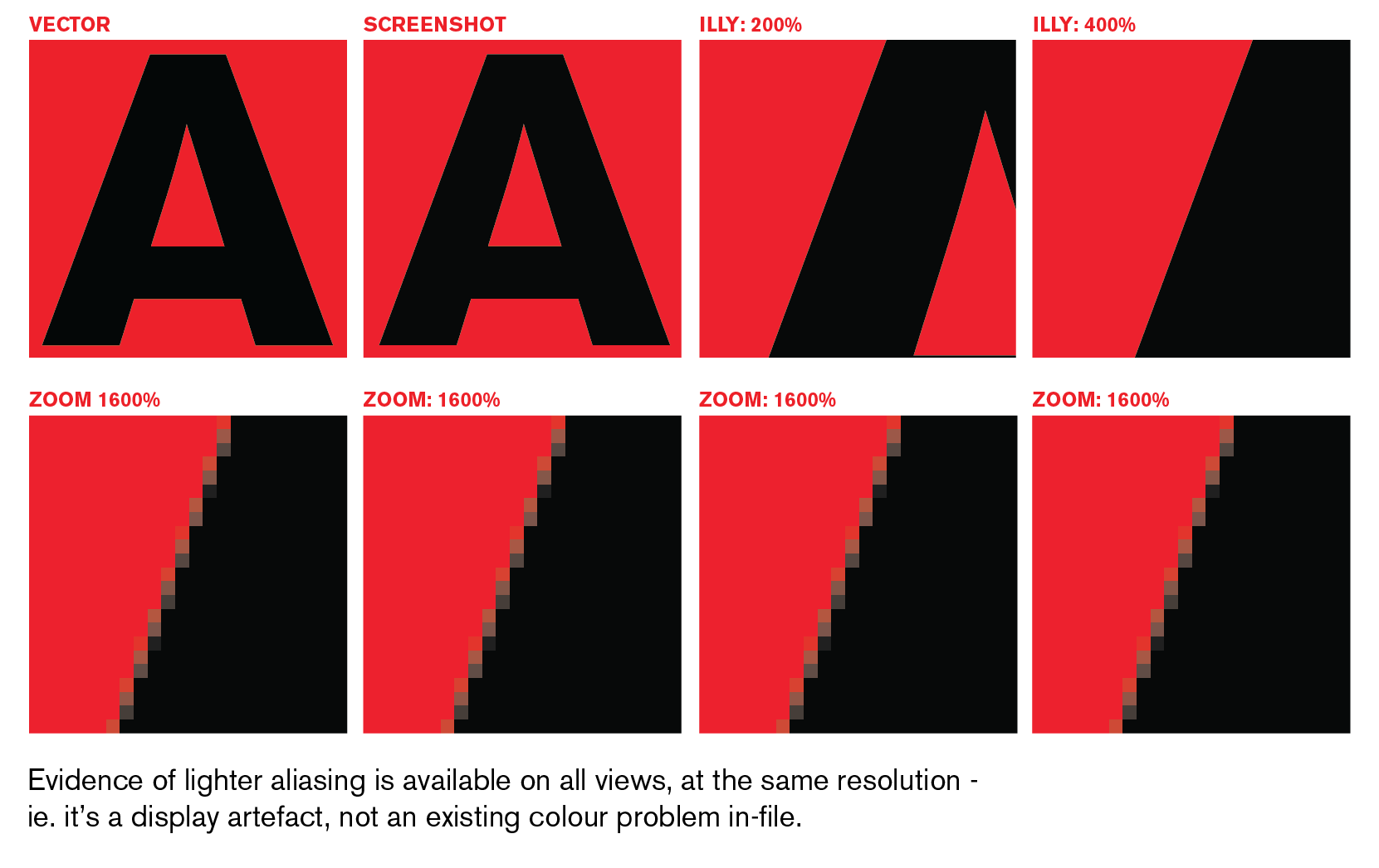
Illustrator CMYK test / help.
- Started
- Last post
- 20 Responses
- mybrokenshoe
Hello Folks, just wondering whether any one could do a test for me in regards to Illustrator CS3?
If I create a new document, in CMYK and the start to draw shapes,for example black on red, I get a weird jagged shape around the edge, sort of like a bitmap. It looks like this (zoomed in):

However if i then change the set the Document Colour Mode to RGB it disappears.
If it then switch back to CMYK it doesn't not return, until I start a new document...Is it possible for any one to test whether this happens on their CS3?
Or Do i have some weird setting turned on?
Any help would be much appreciated...
thanks
- detritus0
I suspect they're artefacts - do they show when you print, or do they just show on-screen (I'd be willing to bet the former)?
I think they're caused by the faked transition between a non-screen black (ie. K) to a 'normal' colour.
- epete220
the font looks corrupted
- detritus0
And the reason they don't show when you convert back from RGB is that the value of K has changed to a moderated RGB colour, which can translate back to CMYK.
I think?
- mybrokenshoe0
Thanks folks,
Hello detritus - I am not sure whether they how up in print, I have yet to send An illustrator file to print (is usually jpg's) and so am concerned about my work appearing in mag's with those artifacts.
As to the font, I just made it so i think thats safe.
- mybrokenshoe0
Ahhh it does seem to only be when i select black from the colour box
Will do some more investigating, Thanks for putting me on the right track detritus.
- No problem.
Assuming I'm not completely wrong, of course!detritus
- No problem.
- detritus0
Can you not do a test print locally?
I've seen these little buggers turn up in my CMYK documents beforehand, so *personally* I'd not be too concerned.. though I'd fish for some other, more competent, people's opinions first!
- dan53820
When I've seen this problem, the artifacts generally show up on local printers (lasers, office jets, etc.) but if its a pro print job (press) than there should be no problem.
- horton0
doesn't make sense with black only, but is your pixel preview turned on.. ? under VIEW menu?
also try screwing with the Anti Alias pref and appearance of black prefs.
- Apperance on Black does not change it either.mybrokenshoe
- mybrokenshoe0
"Can you not do a test print locally?"
my printer is having trouble regonising cartridges so at the mo, sadly nope.
"though I'd fish for some other, more competent, people's opinions first!" - Am going to post on the adobe site see what they say... and I post up anything interesting here.
- mybrokenshoe0
Nope pixel preview is off, Gets worse if it's on!
Turning off Anti Alias gets rid of the issue, but then i have super jagged bits.
- horton0
... and these are vector elements right? sounds like your illustrator may be fcked. have u tried a good old relaunch/restart?
- mybrokenshoe0
yep vector shapes. It's been doing it for a couple of day, or at least i have noticed it in the last couple of days. I usually would in Rgb copy to PS and convert to CMYK. Is only when i decided to work CMYK in Illustrator I noticed it.
Just checked it out in CS1 and 2 and it is the same. (though CS1 less)
- Dancer0
Haven't read all but have you sorted it?
I think I know why
- Dancer0
Now I have read the posts I don't think I do know. I was going to say is have you accidently turned on your pixel preview (in the view menu)
- detritus0
Horton - Maybe it's a PC thing? You noted that BrokenShoe said the above image was 'Zoomed In'? Really, it's nigh on indiscernible in a practical sense. I'd guess it's due to Illy not bothering with any clever processing to accurately render a CMYK transition to Screen RGB, which if you think about it logically, it would have to do which makes sense, as calculating a very heavy document's full aliasing range would get very processor intensive).
I first noticed this a few years back and fretted about it then - but really, it's not an issue. Even if it were, the two or three pixels worth of problem wouldn't translate visually to print.
- mybrokenshoe0
Hey Folks, Thanks for the help,
I not particularly fretting, it just bugs me seeing it in my images, I always seem to notice little bits.

Yes it is really minor too! :)
I will just work in RGB and then if needed convert to CMYK. That solves it.
Thanks again folks.
- <- Actual size left half with artfiacts right with none. that greenish edge drives me crazy :)mybrokenshoe
- epete220
i got it on my mac but once i zoom in super close its fine
- mybrokenshoe0
Hey detritus, Very thorough!
Thanks for checking it out, much appreciated.