3D effect in illy
- Started
- Last post
- 12 Responses
- fues
http://t0.gstatic.com/images?q=t…
The X and so on, I think I saw an illustrator tutorial not so long ago on how to easily achieve that 3d effect.
Any help greatly appreciated.
- albums0
You could illustrate that 3D faux like by converging disappearing lines in the center after distorting your image to appear larger in the middle. If you want real (fake) 3D use the extrude function.
- fresnobob0
The way to do it is to learn perspective... In reality, thats not even perspective, it just looks sort like it...
- monospaced0
Draw flat shape and select it (X). Effect > 3D > Extrude & Bevel...
Then just set the angle and extrusion depth to your liking. A perspective degree will give it that extra perspective, and a custom bevel will help with the extra edge.
- this is correct.Fuzziest
- This is not how the OP image wad madealbums
- *wasalbums
- No, it's probably not, but the OP was asking how to do this 3D effect in Illustrator and I answered that.monospaced
- tcmmct0
Sketch it out. Create the vector art.
- Miguex0
it won't look like that out of hitting a preset, but a good way to get started is the extrude tool in illustrator.
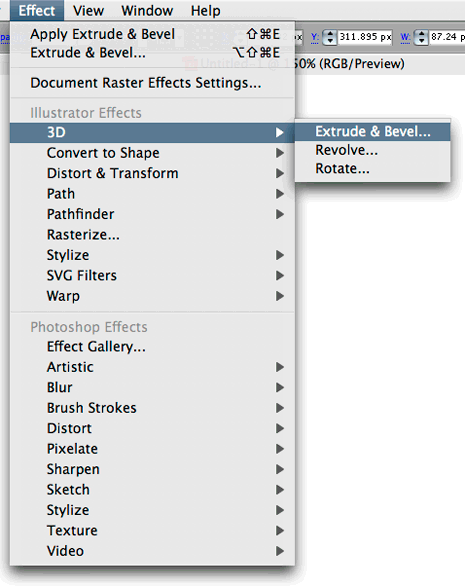

the extrusion tool is only 40% of the result, you won't get the shadows or detail, but put a couple of hours touching up and you will be there :)
- No way! Incredible, I can't believe nobody had posted this yet.monospaced
- Very informative... extrude you say? Hmmmalbums
- hahahahaMiguex
- hahahagoldieboy
- Miguex0
I remember before they included it, this was a separate plug in from zaxwerks
- marychain0
Have you tried Extrude yet?
*ducks
- i_monk0
Can this be done in Illustrator?
- fresnobob0
you could use the blend tool...
- what... the... fuck?monospaced
- You could yes, if you want an uncontrollable jaggy mess of seperate objects.detritus
- Miguex0
snap!
