Chrome font problems
- Started
- Last post
- 20 Responses
- CyBrainX
Is there any way I can stop this from happening?
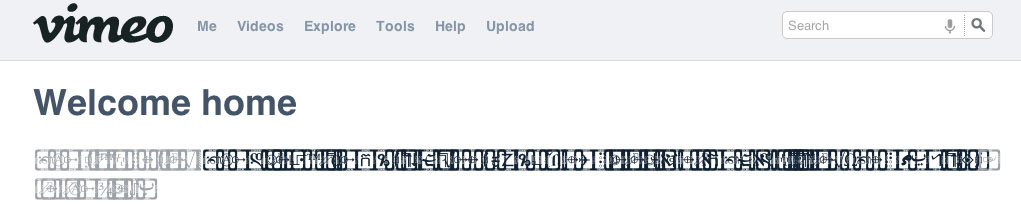
So far tried customizing fonts in advanced settings without consistent results.
I'd rather not go back to Safari or Firefox.
- MrT0
I'm having the same issue. It's related to activating fonts through a 3rd party app (Font Explorer for me). I've had moderate success restarting the browser but it seems to be an issue in progress. Also rather not go back to other browsers as well.
- Centigrade0
Got the same thing here a few days back on sites using Georgia. I had to do a full restart to fix it. I was using suitcase at the time.
- CyBrainX0
My issue is Helvetica. I tried a non-system version of Helvetica which worked for a little while after restarting Chrome. I even tried resorting to Arial. That's when I started to think about switching back to Safari or Firefox. I mean, how much am I supposed to put up with?
- Amicus0
c'mon Google, get your shit together. I'm having to flick back to Safari for any site that has issues.
- Al_dizzle0
I had this happen on machines at previous studios I worked for.
I think it has something to do with 3rd party font managers + font conflicts or corrupted fonts.I'm using FontExplorer Pro at home and I keep my stuff pretty tidy (no conflicts no corrupted fonts) and I haven't had those problems.
- CyBrainX0
I've been using Font Explorer too.
Seems like that's the culprit but I'd rather go back to Safari or Firefox than use Fontbook.
- d_rek0
Really? I've never had issues with fontexplorer + chrome and I use both on a day-to-day basis.
- MrT0
Unfortunately it's not a Font Explorer problem, it's a Chrome one. Related to permissions on font folders and Chrome's decision to use the Last Resort font...
- ArmandoEstrada0
Its a webkit/Mac issue happens in Safari too. You're using a 3rd party font manager. Open it, select all fonts, deactivate them. Restart browser. Should work.
- never had the problem in Safari, but I'm still using Snow Leopard.Amicus
- fourth0
A similar thing happens to me with FontExplorer and Safari, and it started with Lion I believe.
If you have the font activated in fontexplorer it will show up as squares in the browser. Pretty damn annoying because it will go away once you deactivate the font but then you have to do this dance when you work on a comp with the font, and then in turn go to look at it in the browser. FWP
- dbloc0
Chrome doesn't work well with font managers...That's why I quit using it. If they fix this problem I might go back....Might.
- hans_glib0
me too - back with safari (and font explorer on snow leopard). fucking google should sort it out
- mekk0
Same issue with fontexplorer.
Solution: Dont double-import PS/OT/TT-Fonts!
- hardhat0
It's pretty surprising google has failed to sort this. even if it IS a problem with font managers you'd think it would be in their interest to work a fix
- CyBrainX0
Any workaround for this doesn't seem worth it. I might have to audition Safari and FIrefox to find a winner.
- dbloc0
has anyone found an answer to this issue?
- monospaced0
It's just your installed Helvetica Neue conflicting with the Mac OS Helvetica Neue. Disable one and it's solved.
- fredddddd0
Just use the normal Helvetica and Arial and turn off the rest.
- fourth0
this happened to me in safari as well. currently it occurs in chrome with one font when I visit youtube.
I use font explorer. I cleared my font cache and that did the trick
- utopian0
No problems while running Suitcase Fusion...